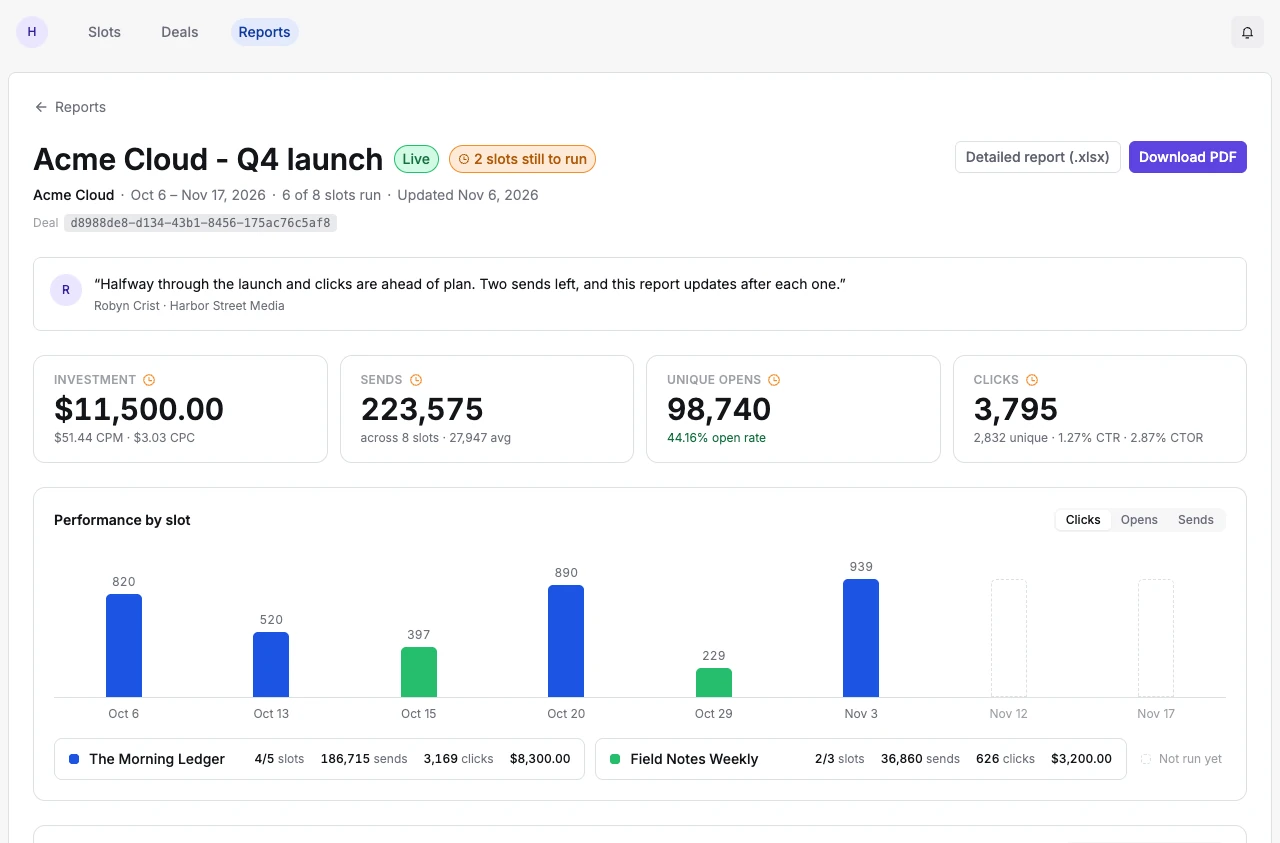
An advertiser asking “How did we do?” usually wants two answers. Did every placement we bought run, and what happened when it did? Sponsy’s campaign report brings the booked placements and their available metrics together on the deal. Your team can inspect the live figures, choose the sections the sponsor sees and share a report in the advertiser’s portal.
Start with the agreement, then check delivery
Open the deal for the campaign you want to report on. If a buyer ran two campaigns with different objectives, start with the right deal so the totals have a clear meaning. A brand-awareness package in three publications is a different unit of analysis from a single placement purchased to drive registrations.
Check the individual ad units before writing a summary. Review the run dates, placements and publications. A website flight spans a period. A newsletter mention belongs to a particular issue. If the deal still has placements to run, identify them as upcoming. A buyer receiving a mid-campaign update should be able to tell why they see results for only part of the package.
Imagine a buyer paid for four weekly placements and asks for an update halfway through. Show the delivered issues with the performance available so far and point out the remaining dates. This answers a commercial question that a screenshot from your email platform alone rarely settles. The buyer can see what the results cover as well as what they can still expect.
Make the metric fit the placement
Start with the source assigned to the placement. A publication might have one integration for email campaigns and another for a different placement type. A podcast download, an email open and a website impression describe different actions. Check the metric labels and definitions before comparing two products or presenting a combined result.
For email, confirm which counts are total and which are unique. A reader can click the same link more than once. Total clicks and unique clicks can both be useful, but they answer different questions. The definitions in the report give the reader a way to interpret the figure you chose. A sponsor note is a good place to explain why a particular measure fits the original objective.
If a number looks surprising, follow it back to the slot and its data source. Check the reporting period and whether the metric has arrived. A placement awaiting results should not become evidence that the creative failed. For a manually entered metric, check the value with the teammate who recorded it before sending the report.
Choose the right report for the reader
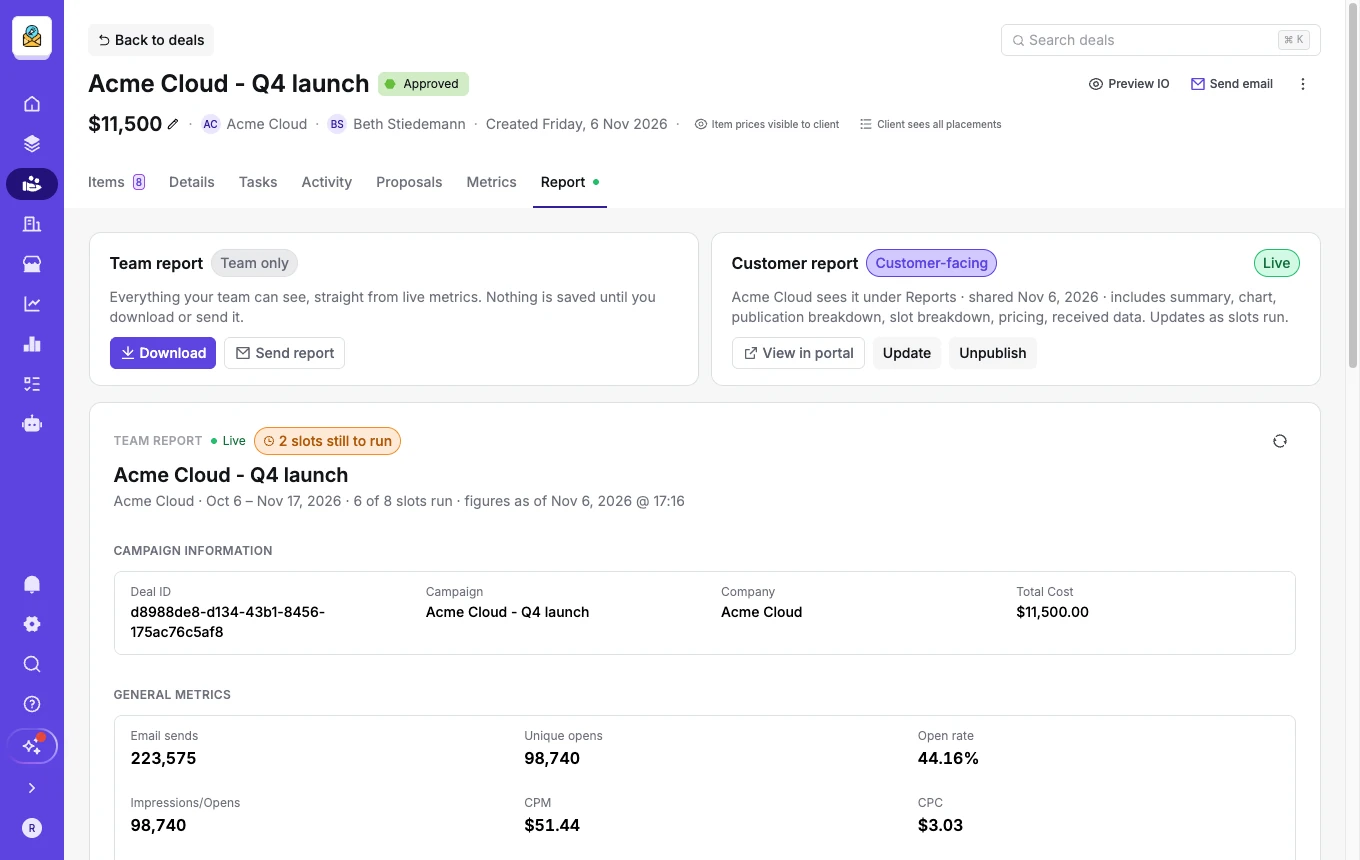
The team report reads live metrics and can include the campaign details, ad-unit rows, definitions and a table sent to the deal. It is useful for the person checking the numbers because they can inspect the underlying rows and copy an identifier when they need to investigate one. Refresh it to load the current figures.
The customer report is the version the advertiser can see. Select the summary metrics, performance chart, publication breakdown or per-slot breakdown that will help that buyer. Choose whether to include pricing and add a note if a change in schedule or creative helps explain the results. A regional advertiser buying a single placement probably needs less detail than a national agency reconciling a network-wide campaign.
The figures that appear in both reports agree. The distinction is who can view each section. Before sharing, check the sponsor’s version and the customer attached to the deal. A deal without a customer has no customer portal in which to publish its report. Publishing the customer report also makes the deal public. Its cost metrics use the full deal value, so a mid-campaign CPC can look higher before the remaining placements deliver.
Give the sponsor a link or a file
A live customer report gives the buyer a place to come back to as the campaign progresses. Publish it when the content is ready, then share its portal link. The new customer portal also gives advertisers separate areas for campaign reports and individual slot reports. Direct a buyer to the level that matches their question.
For internal reconciliation, the team report can download Excel with a row per ad unit, or a printable PDF summary. Sending the team report opens a composer with the workbook attached so you can review the message and attachments. Financial fields follow permissions. An exported file reflects the figures when it was generated, so refresh and download again when you need an updated copy.
For repeat reporting, consider a time-based slot automation that syncs the slot with the connected provider and then sends a report email. Set the delay to allow results to arrive. Use the campaign report for the wider account conversation when several slots went into the same purchase.
Turn the results into a renewal conversation
Read the report against what the buyer wanted. A high click count may deserve attention, but so might reliable delivery across a launch window or a better response to the second piece of creative. Compare similar placements where possible and explain changes in format or audience before drawing a conclusion.
A good closing note is specific enough for the buyer to act on. For example, identify the issue that produced the strongest response and suggest testing the offer again in that same position. Keep a distinction between an observation in the report and a hypothesis to test next time. The campaign data gives both sides a shared starting point.
Frequently asked questions
Can I report on a campaign that is still running?
Yes. Share a customer report during the campaign and use the placements still to run to explain what remains. Current results cover only the placements and metrics available at that point.
Can we share performance without sharing prices?
Yes. Choose whether to show pricing in the customer report when configuring its contents. Check the sponsor-facing view before distributing the link.
Which export should an agency use?
The team can download Excel when it needs ad-unit rows for reconciliation, or a PDF for a printable summary. The customer’s available downloads depend on the portal and report settings.
How is this different from workspace Metrics?
A campaign report explains delivery and results for one deal. Workspace Metrics helps the publisher compare publications, monitor fill rate and look at revenue over a selected period.