Newsletter welcome survey: what to ask new subscribers, based on 175 signup flows
We went through 175 newsletter signup flows. Only 68 asked new subscribers a question. See what they ask, copy the questions, and set up your own survey.
Table of Contents
- What is a newsletter welcome survey?
- How many newsletters ask a welcome question?
- What newsletters ask new subscribers most
- Welcome survey questions you can copy
- Where to put the survey: thank-you page, welcome email or reply
- Six newsletter welcome survey examples
- 1. Morning Brew: start broad, then ask for detail
- 2. The Daily Upside: give readers a second chance in email
- 3. The Rundown AI and The Neuron: give a longer quiz a payoff
- 4. Growth Unhinged and Demand Curve: ask as much as you can use
- 5. Catskill Crew: ask how readers know the area
- 6. Total Annarchy: ask for a reply
- How to set up a welcome survey in beehiiv, Kit, SparkLoop or Tally
- How to use the answers in your content and media kit
- How to show sponsors who clicked
- How to fill the gaps with enrichment
- Welcome survey mistakes to avoid
- Start with one question
- Frequently Asked Questions
We went through 175 newsletter signup flows for Sponsy’s After the Signup study. Only 68 asked new subscribers a question. That’s 39%. Among the 66 flows we could categorize, 34 asked about goals, challenges, or interests. Only 30 asked for a name.
Right after signup, readers still remember what brought them there. A friend forwarded an issue, or they found you while trying to solve something at work. Ask while that reason is fresh.
Below are questions you can copy, real signup screens, and ways to use the answers in your newsletter and sponsor reports.
Three takeaways
- Start with one question you’ll act on. Two or three are plenty for a first form.
- Ask on the thank-you page or in the first welcome email, after any email confirmation.
- Tell sponsors how many readers you have data for.
What is a newsletter welcome survey?
A newsletter welcome survey is a short set of optional questions for new subscribers. It helps you learn who your readers are and what they want to read, so you can plan better coverage and describe your audience to sponsors.
Also called a new subscriber survey or newsletter onboarding survey, it can be a form on the thank-you page, a question with clickable answers in the welcome email, or a prompt to hit reply.
An editor might ask what readers are struggling with and turn a recurring answer into the next issue. A publisher selling ads might ask about roles and industries so sponsors can see whether the newsletter reaches the people they want to talk to.
How many newsletters ask a welcome question?
Of the 175 verified signup flows, 68 (39%) asked at least one reader question. Of those, 45 used a form, quiz, or poll, and 23 asked for an email reply.
For After the Signup, we subscribed as readers and recorded the prompts we saw on the site and in the inbox. A reader question was any prompt asking subscribers to tell the publisher something about themselves or their signup. After email confirmation, The Browser asked how readers found it. Total Annarchy asked readers to reply to the welcome email. A screen that simply recommended other newsletters fell outside that definition.
The form count includes four Brew questionnaires for which we captured the first screen. Across all formats, we had enough detail to categorize the questions in 66 flows. That’s the group behind the chart below.
A few publishers used the same form across multiple titles. Industry Dive, for example, reused its professional profile questions across editions. The counts are by newsletter, so a question can show up several times because one publisher made the same choice for several titles.
These figures describe what we observed in this group of newsletters. We didn’t have access to their submission totals, so the study can tell you how often publishers asked, but it can’t tell you how often readers answered or whether one format performed better.
What newsletters ask new subscribers most
Goals, challenges, and interests came first: 34 of 66 newsletters asked about them. Role and work responsibilities came next (31), followed by name (30), company or publication details (24), and location or local ties (19).
Fewer asked about experience, habits, and tools (18), demographics or personal finances (8), where the reader found them (6), or interest in offers and updates (5).
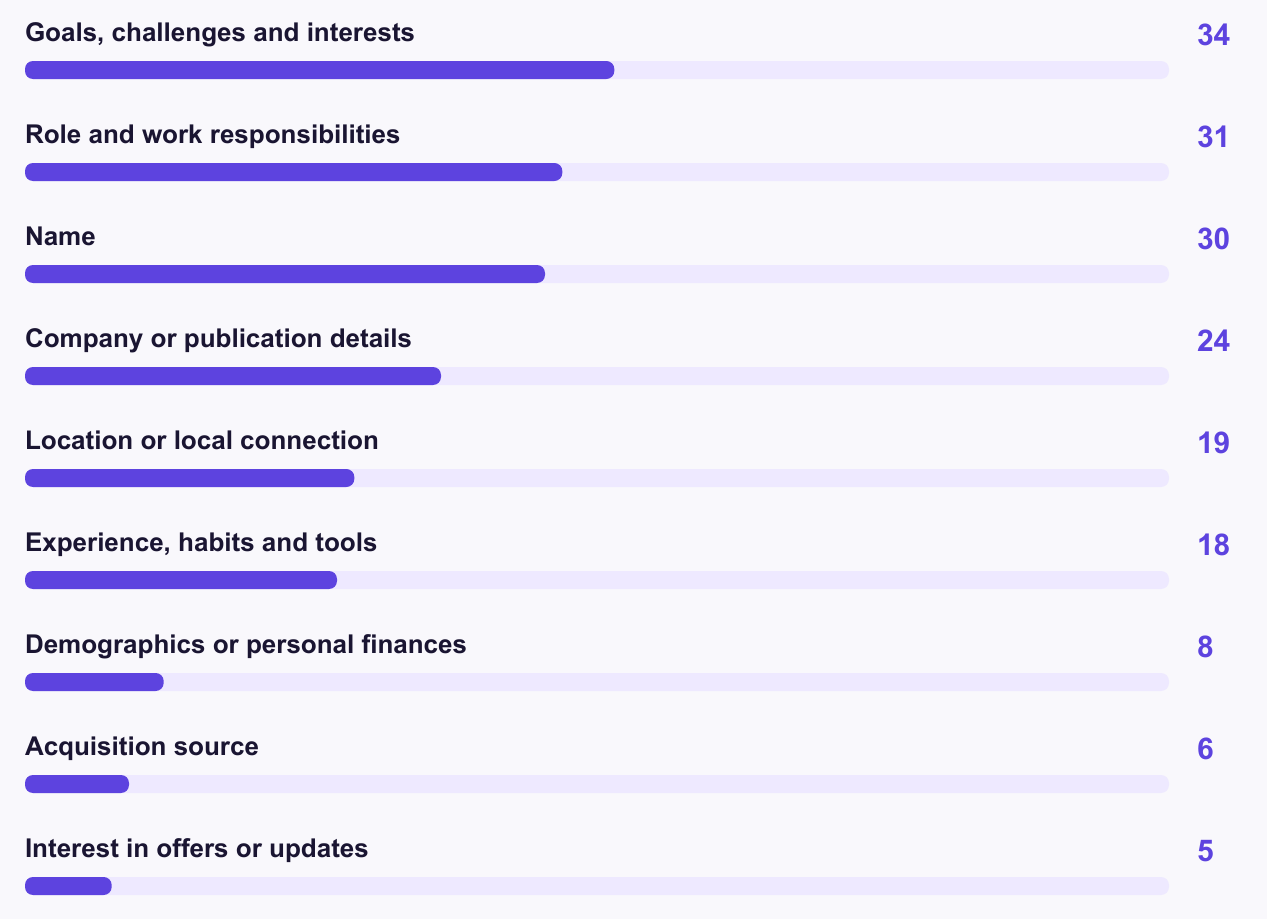
Source: Sponsy’s After the Signup study. Each newsletter could appear in more than one category.
Start with the decision you need to make. If you’re deciding what to cover next Tuesday, ask what readers are trying to get done. If you’re updating a sponsor deck, ask about work or industry. Each of these six questions from the study gives you a different answer to work with.
- What were you hoping we could help you with? Use repeated answers to choose a topic for your next issue or welcome email.
- What do you do, and where do you work? Describe the readers a sponsor can reach. Split this into separate fields if you’ll report on role and employer separately.
- What’s your connection to this area? Decide how much room to give everyday local news versus weekend guides.
- How did you first hear about us? Compare what readers remember with your tracked signup sources. A forwarded email or a recommendation from a friend may never show up as its own channel.
- What are you working on right now? Send a resource the reader can use this week. Someone hiring their first marketer needs a different example from someone fixing their paid acquisition.
- Would you like to hear about this offer? Find out who wants that specific follow-up. Ask separately from editorial preferences and the newsletter subscription.
Get the free After the Signup report. The 26-page guide includes the question index for all 66 flows we could categorize, plus more screenshots from the study.
Welcome survey questions you can copy
Use a choice field when you want to group answers later. Give people an “Other” option when the list can’t cover everyone. Keep one open question for the answer you can’t predict. That’s often the one that gives you your next issue.
B2B or trade newsletter
- Which team or function best describes your work? Pick one. For a general business newsletter, try finance, operations, sales, marketing, product, engineering, or other. If you need seniority for sponsor reporting, ask about it in a separate field.
- What industry do you work in? Pick one. Use the categories you’d want to show in a sponsor deck. A trade publication might ask which part of its own industry the reader works in.
- What should we help you do better? Leave this open. “Explain a budget cut to my team” gives you a more useful starting point than “finance tips.”
If you sell sponsorships, the first two answers can show whether you reach the people a buyer is looking for. The third is for the person writing the newsletter. Read a handful of those answers before you lock in next month’s editorial calendar.
Consumer or creator newsletter
- What are you hoping to get from this newsletter? Leave room for a sentence. A reader of a home cooking newsletter might say they need dinners their kids can help make. That gives you something specific to cover or add to the welcome email.
- How did you first hear about it? Offer a choice of friend or colleague, another newsletter, a podcast, social media, search, or other. Compare the answers with the signup sources you already track.
If you can only ask one thing, pick the first question when you’re planning coverage. Pick the second if you’re deciding where to spend time growing the list. Readers sometimes remember a recommendation from a friend that your analytics records as a direct visit.
Local newsletter
- What neighborhood or area do you spend the most time in? List the places you cover and include “Somewhere else.”
- What’s your connection to the area? Let readers pick what fits: I live here, I work here, I visit, or I used to live here.
- What should we cover more often? Leave it open so readers can name a street, event, or business you might have missed.
A reader who works downtown and lives outside the city may still care about downtown lunch spots. Asking about time spent in a neighborhood tells you something a home ZIP code alone can’t.
Where to put the survey: thank-you page, welcome email or reply
On the thank-you page. This is the shortest route from signing up to answering. Tell readers they’ve subscribed, say what the answers will help you do, and give them an obvious way to skip. A one-question form works well here because readers can finish it before they move on.
In the welcome email. A link gives people another chance to answer if they closed the signup page or skipped the form. Say what you’re asking for: “Tell us what you’d like us to cover” is more useful than a button that says “Take our survey.” If you can tell who already answered, send the reminder only to people who haven’t.
As a reply. If you want a sentence in the reader’s own words, ask them to hit reply. It feels like the start of a conversation and doesn’t require another page. The trade-off is that someone needs to read the inbox and group the replies if you want to count them. Use a form if you need a monthly breakdown by role or neighborhood.
With double opt-in, use the immediate thank-you page to tell readers to check their inbox. Ask the survey question on the page they see after confirming or in the first welcome email. You can test both placements once you have enough signups to compare them. Keep the question the same while you test where it goes.
For each placement, count how many subscribers had a chance to answer. A visit to the confirmation page and a delivered welcome email measure different things, so track them separately.
Six newsletter welcome survey examples
These are six patterns we saw in the study. The screenshots show the flows as captured for the report.
1. Morning Brew: start broad, then ask for detail
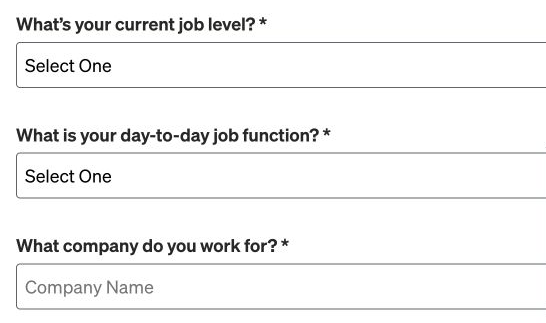
Morning Brew collected a name, then asked for job level, function, and employer. Choosing Business Ops revealed a more specific role question. Industry, company size, and postal code came later. Try this: Ask everyone the broad question. Show a follow-up only when the extra detail would change what you send or how you describe that audience.
2. The Daily Upside: give readers a second chance in email
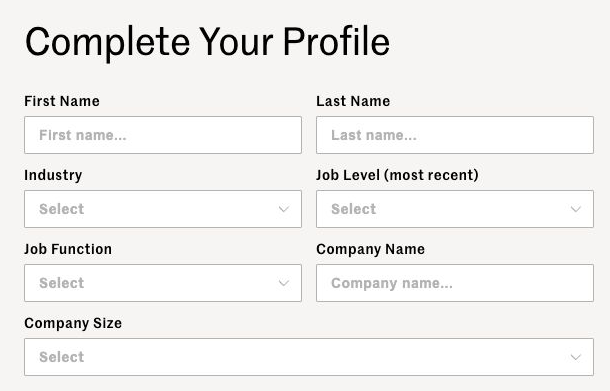
The Daily Upside showed a professional profile on the site and linked to a version in the welcome email. The email-linked version also offered subscriptions to other editions. Try this: Put the profile link in the welcome email for readers who leave the site. Give edition subscriptions their own choice.
3. The Rundown AI and The Neuron: give a longer quiz a payoff
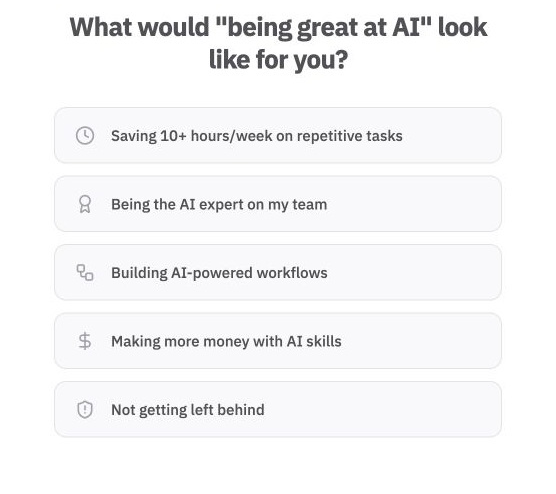
The Rundown AI asked what success with AI would look like and pointed readers to its playbook in the welcome email. The Neuron’s readiness quiz promised a score and recommendations, and asked what readers already did with AI. Try this: Tell readers what they’ll get for completing a longer quiz. A reader who’s just experimenting with AI could get a starter exercise, while someone building with it could get a guide to automating a workflow.
4. Growth Unhinged and Demand Curve: ask as much as you can use
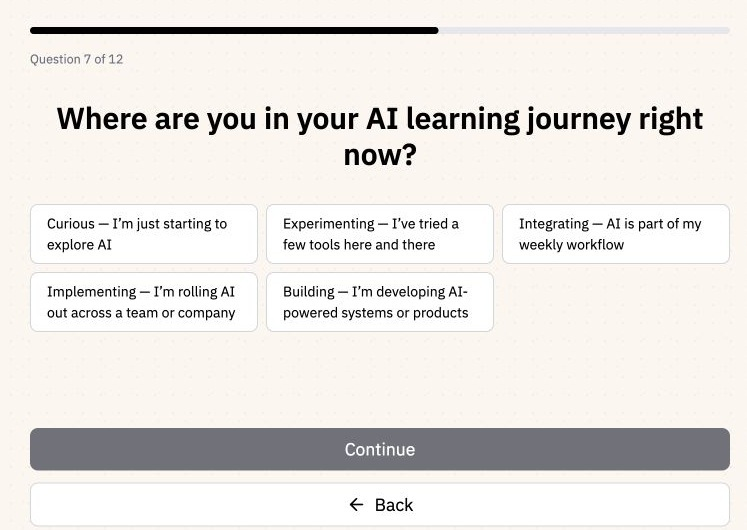
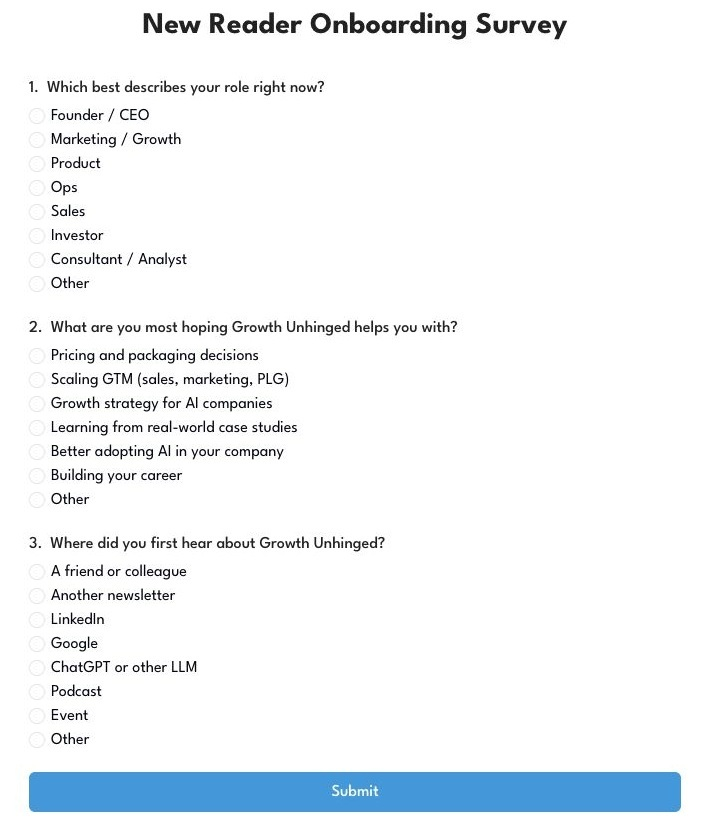
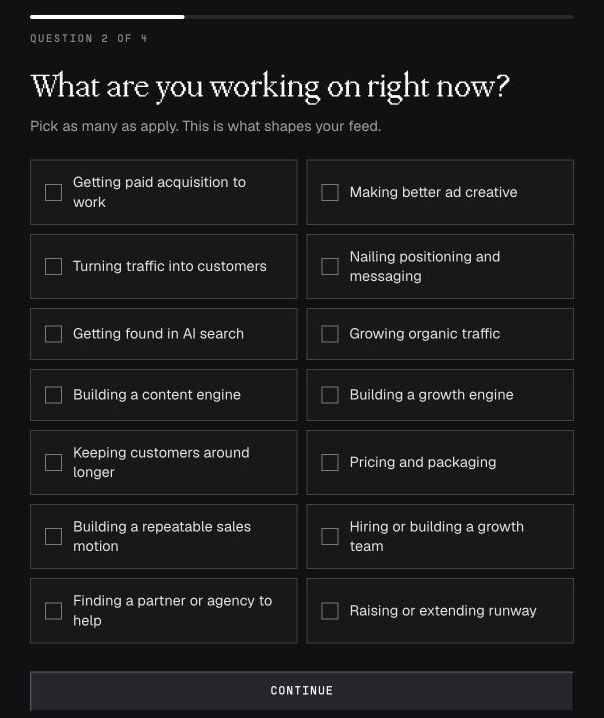
Growth Unhinged asked three things: role, what the reader wanted help with, and how they heard about it. Demand Curve asked in more detail about what the reader was working on, how their company grew, and what was hard. Try this: Add a detailed project menu when you have different examples or resources ready for those projects. If you’re still deciding which topics to cover, start with a broad question and let readers tell you which projects belong on the list.
5. Catskill Crew: ask how readers know the area
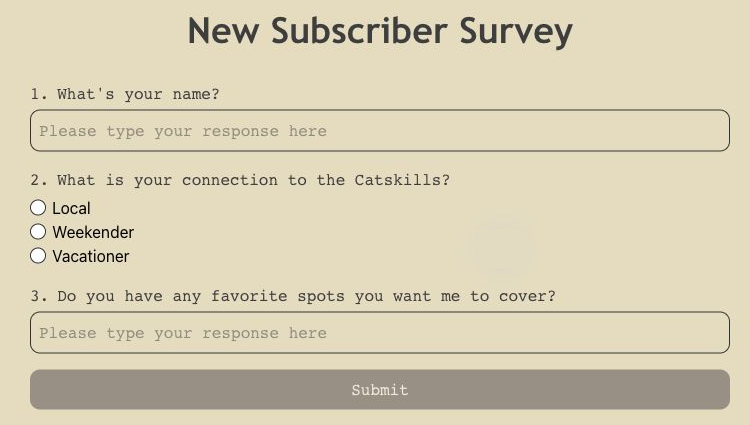
Catskill Crew linked to a survey from the welcome email. It asked readers whether they were locals, weekenders, or vacationers, and which places they wanted covered. Try this: Ask what brings readers to the area. A calendar of town meetings and a guide for a two-day visit can both be useful, but to different readers.
6. Total Annarchy: ask for a reply
After email confirmation, Ann Handley asked why readers subscribed and what they hoped to learn. The questions were right there in the welcome email. Try this: If you’re still figuring out why people sign up, read a dozen replies before you write a dropdown. Their words may give you better choices than the ones you would have written yourself.

Want to see more of the signup screens? The full report includes examples from The Browser, Industry Dive, and other newsletters. Download After the Signup for more screenshots.
How to set up a welcome survey in beehiiv, Kit, SparkLoop or Tally
Use whatever gets the answers back to a place you’ll check. If you plan to send different emails based on an answer, save it to a custom field on the subscriber record from the start.
beehiiv welcome survey
- On a paid plan, create a survey, map each question to a subscriber custom field, and publish it.
- In Advanced Website Builder, add a survey page to a signup flow. Select your survey and assign the flow to your site’s native subscribe form.
- Repeat the survey link in the welcome email. Readers who leave mid-flow before the survey won’t see that step again through the signup flow. The email link also works as an entry point when you use an external embedded form.
beehiiv survey guide · beehiiv signup flow guide
Kit welcome survey
- Create a custom field for your question, such as “Main interest.”
- In Rules, create a Link Trigger for each answer. Choose “Clicks a link” and set the action to “Set custom field.”
- Add the triggers as individual links in your first welcome email. Kit’s Link Groups don’t support Link Triggers. For a longer form, link to it in the email or redirect readers to it after they confirm.
Kit survey guide · Kit confirmation settings
SparkLoop welcome survey
- In Tools → Signup Flow → Edit Flow, open the Survey panel, turn it on, and add your questions. SparkLoop recommends five or fewer.
- Create the destination fields in your email platform, then map each question. Direct sync supports Kit, beehiiv, Mailchimp, Campaign Monitor, and ActiveCampaign. You can also export the responses as a CSV.
SparkLoop welcome surveys guide
Tally welcome survey
- Publish a short form and link to it from your thank-you page or welcome email.
- To match responses to subscribers, ask for their signup email or pass an opaque subscriber ID in a hidden field.
- Send responses to a spreadsheet or map them back to your email platform through an integration.
Tally hidden fields · Tally integrations
Run through the live flow on your phone with a fresh email address. Confirm the subscription, skip the survey once, and try answering from the welcome email. Check that the answers land on the right record and that someone who skips still gets the newsletter.
How to use the answers in your content and media kit
Read the open answers before you build a dashboard. If a theme keeps coming up, turn it into a test you can run. Say you write for finance teams and readers keep asking for help presenting forecasts to a board. Send one issue with a real forecast and a short explanation of how to talk through it. If it lands, add it to the welcome sequence for people who choose that topic.
For your media kit, start with a breakdown you could explain in one sentence. “Of 400 readers who answered our role question, 160 work in finance.” Add the date range and use the count for that particular question. If 250 people answered the industry question, use 250 for that breakdown. Show the total list size alongside the survey counts so sponsors can see how much of the audience you heard from.
Then build a segment when you have something different to send it. A local newsletter could offer a Friday events roundup to weekend visitors. A B2B newsletter could send first-time managers a welcome issue with templates the rest of the list doesn’t need. If you’ll use a field only once in a pitch, it can stay in the media kit. There’s no need to build an automation around it.
How to show sponsors who clicked
A media kit describes who a sponsor could reach. A campaign report can show which part of that audience engaged. Before the ad runs, ask the sponsor which readers they most want to reach. “Founders and sales leaders” gives you something more useful to report against than “people in software.”
Here’s a made-up example. A software sponsor wants to reach founders and sales leaders.
- 120 people clicked the ad link.
- 100 of those unique clickers had enough profile data to classify.
- 72 matched the sponsor’s target.
Put those numbers next to each other in the report. You can say 72% of classified clickers matched, with 83% profile coverage (100 of 120). That leaves 28 people with profiles outside the target and 20 whose roles are unknown. A click tells you who took an action on the ad. Use conversion data if the sponsor also wants to know how many people signed up or bought something.
In Sponsy ad reports, the Campaign Insights beta can match tracked clicks to available audience profiles and show a breakdown by role or industry. If you do this by hand, report the target, the match count, and how much of the click audience you could classify.
Use the same definition of a match in the next campaign. If a sales manager counts as a sales leader this month, apply that definition again when you compare results.
CJ Gustafson of Mostly Metrics said he doubled his sponsorship prices after using Megahit to learn more about his readers. That’s one publisher’s result, and Megahit has since closed.
Show buyers who engaged with campaigns like theirs, then use that evidence and buyer feedback when you test your sponsorship rates.
How to fill the gaps with enrichment
Some readers will skip your survey, and a job title someone gave you a year ago may be out of date. Audience enrichment matches subscriber records with outside data to fill in details such as role, employer, or industry. Use the survey for things only the reader can tell you, like why they signed up or what they want to learn.
BuySellAds built audience.is for publishers who want an aggregate breakdown of the people they reach. Apollo’s CSV enrichment is a general B2B option for matching people or companies.
With Sponsy Audience Insights, connect a subscriber source or import a list to see a breakdown of your readers by role, seniority, or industry. You can use those same profiles to see who clicked a sponsor link in Sponsy’s reporting tools.
Keep the source and date alongside each field. Label a role from the survey as reader-reported and a role from a match as enriched. If a reader says they work in operations and an outside match says sales, keep the reader’s answer and flag the discrepancy before using it. Report how much of the audience you could match, leave missing data as unknown, and share aggregate counts with sponsors.
Welcome survey mistakes to avoid
- Asking for information you won’t use. Before adding company size, name the decision that would change if most readers worked at small companies. If you can’t, leave it out. Take another look after your first month and remove fields you never opened.
- Trying to build a complete profile on day one. Start with a couple of useful answers. Ask for more when you have a concrete reason, such as sending different guides to beginners and experienced readers. Ask about experience once you have both guides ready.
- Mixing sponsor opt-ins with profile questions. Give offers a separate, clear choice. Say what readers will receive and who will get their information if they opt in.
- Making offers hard to skip. If a download or partner offer sits between survey questions, show how to continue without taking it. Put the skip link on the same screen as the offer. Readers should know their newsletter subscription is already taken care of.
Frequently Asked Questions
Start with one question if you’re testing the idea, or two to three for a short form. SparkLoop recommends keeping its welcome surveys to five questions or fewer. Add another only if the answer will change a decision. Review the first batch of responses before you add a field.
- Should a new subscriber survey be required?
Keep it optional. Tell readers when their subscription is complete and make it easy to skip the survey. If you use double opt-in, ask after email confirmation so the survey doesn’t get in the way of joining. Let readers leave individual answers blank, too.
- Should I use a form or ask for an email reply?
Use a form for answers you want to count or save to subscriber records, such as role or topic preference. Ask for a reply when you want to hear how readers describe a problem in their own words and have time to read what they send. You can turn recurring replies into choices for a later survey.
- What’s the difference between a welcome survey and a quiz?
A survey asks readers to share preferences or profile details. A quiz gives them a result based on their answers, such as a score or a recommendation. Use a quiz when that result is useful enough to justify the extra steps. Tell readers what they’ll get before the first question.
Start with one question
Pick something you’d like to know before you send your next issue. Then do this:
- Write down the one thing you want to learn.
- Decide what you’ll change once you have the answer.
- Ask on the thank-you page or in the first welcome email.
- Count how many readers saw the question and how many answered. If you only know how many emails were delivered, label that number as deliveries.
- Read the answers before you add a second question.
Need ideas for what to ask? Get the free After the Signup report and browse the full question index. If you already sell ads and want to connect audience data with campaign results, try Sponsy for free.