Reports
The Reports module is your workspace for building, saving, sharing, and exporting views of your sponsorship data — slots, deals, proposals and storefront orders, with live date ranges, summary cards, custom columns, charts, and CSV/JSON exports.
Reports is available on every plan. Starter includes the last 30 days of analytics. Pro and Custom include full analytics history, exports, and report sharing.
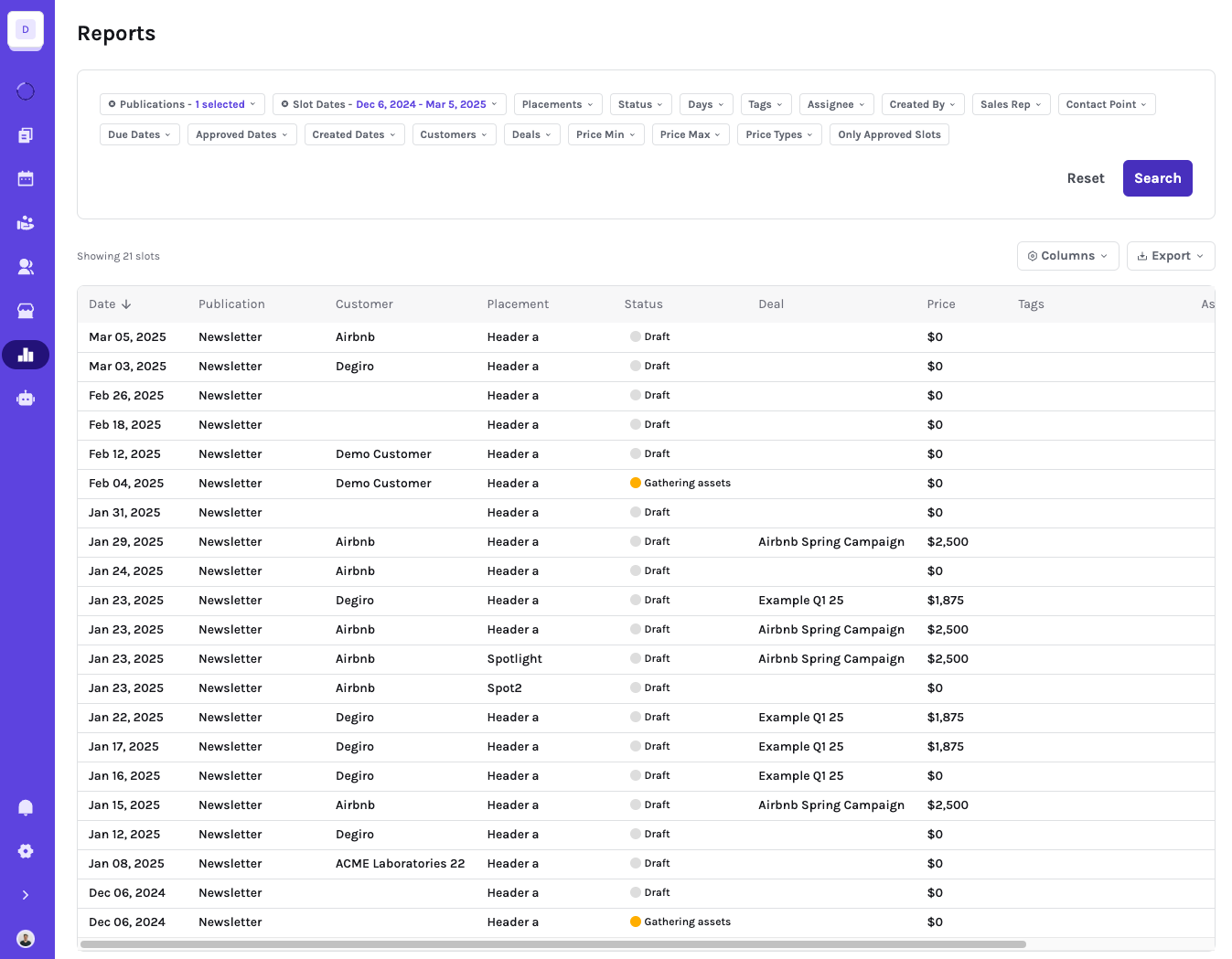
The Reports page is your workspace for building, saving, sharing, and exporting views of your sponsorship data. You can switch between Slots, Deals, Proposals and Orders reports depending on the question you are trying to answer.
Looking for workspace-wide performance dashboards, goals, and revenue recognition? Those live in the Metrics module.
The Reports home
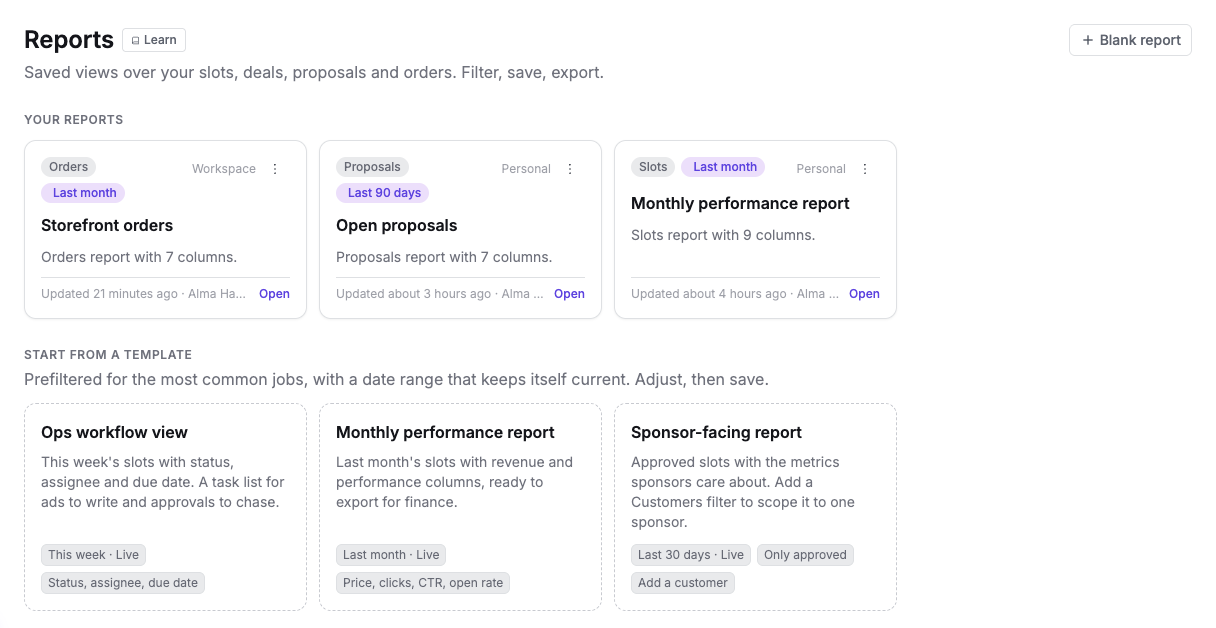
Reports opens on a home page that lists every report you can open: your personal reports and the ones shared with the workspace. Each card shows:
- What the report covers: Slots, Deals, Proposals or Orders.
- Its date range. A relative range such as Last month is shown in purple and keeps itself current. A fixed range that has already ended is flagged as Static range, because it no longer picks up new results. Open the report and pick a relative range to keep it current.
- Whether it is Personal (only you can see it) or Workspace (everyone in the workspace can open it).
- When it was last updated and by whom.
Click a card to open the report. Use the ⋮ menu on reports you created to rename, share or delete them.
Start from a template
Templates open a new report that's already set up for a common job. Nothing is saved until you save it.
- Ops workflow view: this week's slots with status, assignee and due date. A task list for ads to write and approvals to chase.
- Monthly performance report: last month's slots with price, unique clicks, CTR and open rate, ready to export for finance.
- Sponsor-facing report: the last 30 days of approved slots with the metrics sponsors care about. Add a Customers filter to scope it to one sponsor.
Each template uses a live date range, so a saved copy stays current. Use Blank report to start from scratch with the last 30 days of slots.
Slots, Deals, Proposals and Orders reports
Use Slots reports when you want to analyze placement-level performance, content status, publication dates, customers, tags, metrics, and booked inventory.
Use Deals reports when you want to analyze pipeline, revenue, deal status, sales reps, customers, and deal line items. Deal reports can include the individual line items that make up a deal, so you can export the same campaign broken down by publication, placement, date, and price. Deals reports include archived deals unless you filter them out with the Archived filter; deleted deals are never included. See what happens to revenue when you archive or delete a Deal.
Use Proposals reports to follow your sales pipeline: open value, accepted value and win rate, with each proposal's customer, deal, status and value. Use Orders reports to follow your storefront sales: revenue, orders waiting for review and payments. See Proposals and Orders reports below.
The Proposals tab is available to members who can view proposals, and the Orders tab to members who can view storefronts.
Filtering Data
Filters sit right above your results. Use Add filter to add one, then set its value in the filter pill. On Slots and Deals reports, Apply filters appears next to the pills as soon as you change something; click it to update the results. Reset clears the filters. On Proposals and Orders reports, filters apply straight away.
Live date ranges
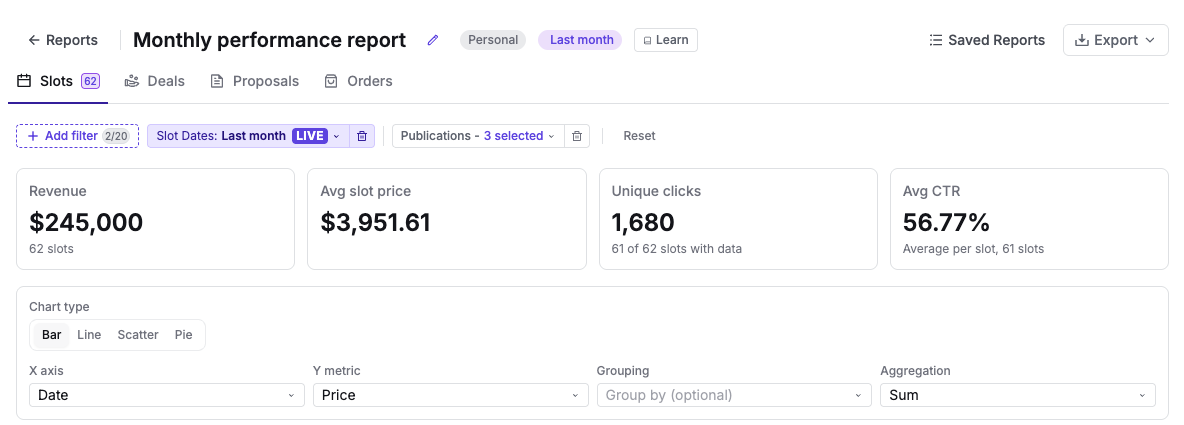
Reports support fixed date ranges as well as relative ranges such as This week, Last month or Last 30 days. When you pick a relative range from the date picker's quick options, the filter turns into a purple LIVE pill. A saved report works those dates out again every time you open it, so a "Last month" report always shows last month without any editing. Hover the date badge next to the report name to see exactly which dates it covers today. Picking specific days in the calendar keeps the range fixed.

Finding deals ready for follow-up
In Deals reports, add the Reporting readiness filter to find campaigns whose last included unit ended at least a chosen number of days ago. Choose the waiting period and any placements to exclude from the calculation. Excluding a placement leaves its units on the deal; those units do not determine when the deal becomes eligible for this report.
For example, a campaign's last ad ends on October 10 while a discount code remains active until December 31. With a 14-day waiting period and the discount-code placement excluded, the deal becomes eligible on October 24.
The calculation uses each booked unit's end date, or its scheduled date for a single-day unit. The waiting period uses UTC calendar days, and a deal qualifies on its calculated ready date. An included unit that has not been booked or has no usable date keeps the deal out of the results. Deals containing only excluded units do not qualify. Rescheduling a unit recalculates eligibility without changing the deal's progress or fulfillment date.
Add the optional Report ready date column to see the date calculated from the active readiness rule. It is separate from any custom field used to record when a report was sent.
Combine this filter with an empty date custom field, such as Report Send Date, to build a queue of campaigns awaiting a report. Record the send date after sending the report to remove that deal from the queue. The calculated eligibility date and the date you record as sent serve different purposes; Sponsy does not send the report when either date is reached or edited.
Save the report to reuse its waiting period and placement exclusions. Other reports keep their existing filters and behavior.
Readiness results use pages when there are more matches than the table can show at once. Use Previous and Next to reach the other deals. The result count shows the current range and total matches. The table, charts and exports use the current page; changing filters returns you to the first page.
Summary cards
Every report shows summary cards above the chart and table, calculated from the rows that match your filters:
- Slots: revenue, average slot price, unique clicks (with how many slots have click data) and average CTR.
- Deals: total value, average deal value, number of deals and how many are paid. When results are paged, the cards cover the current page.
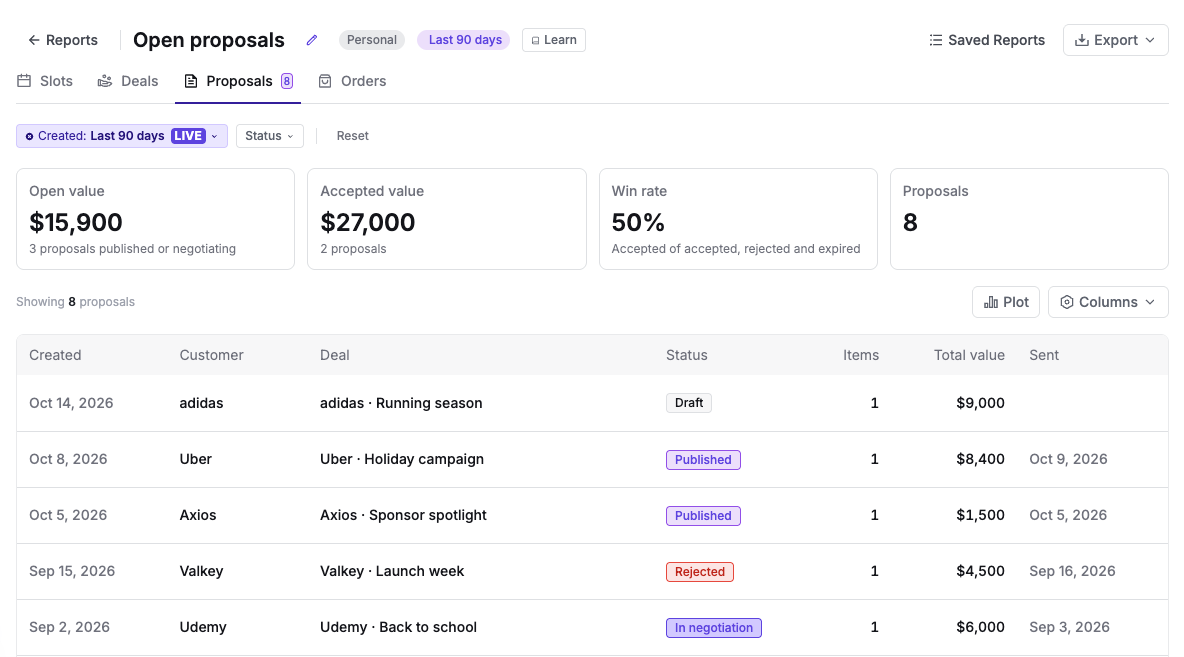
- Proposals: open value (published and in negotiation), accepted value (accepted and IO signed), win rate (accepted out of accepted, rejected and expired) and number of proposals.
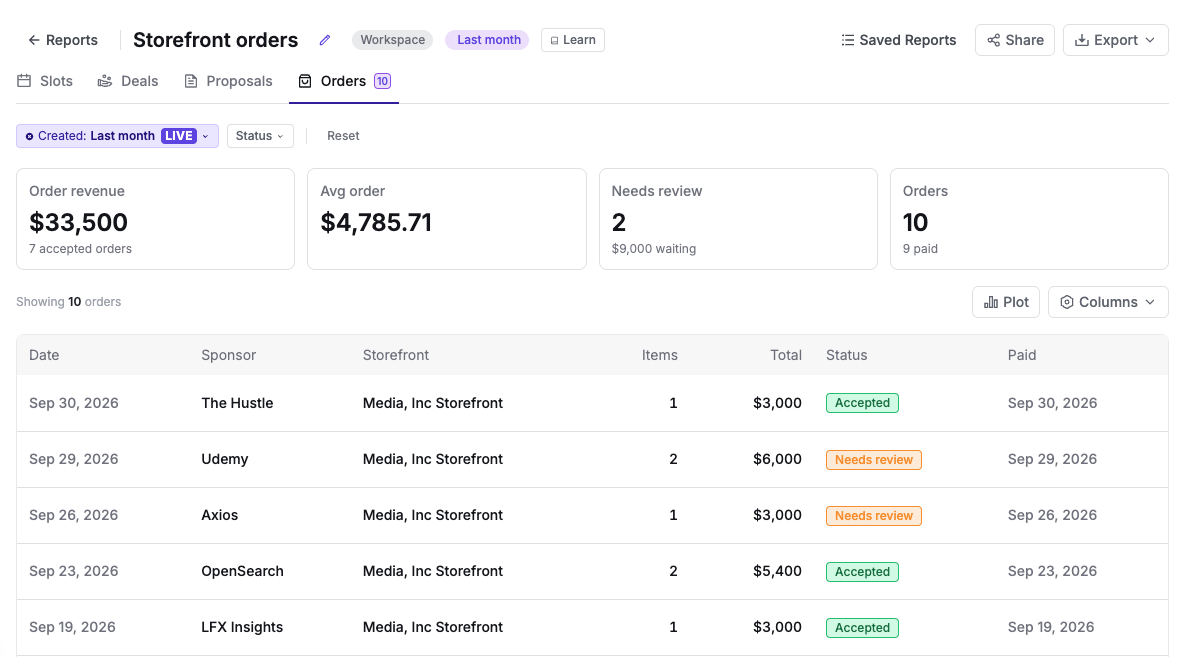
- Orders: revenue from accepted orders, average order, orders that need review and number of orders, with how many are paid.
Members without access to financial data see a dash instead of amounts.
Customizing Columns
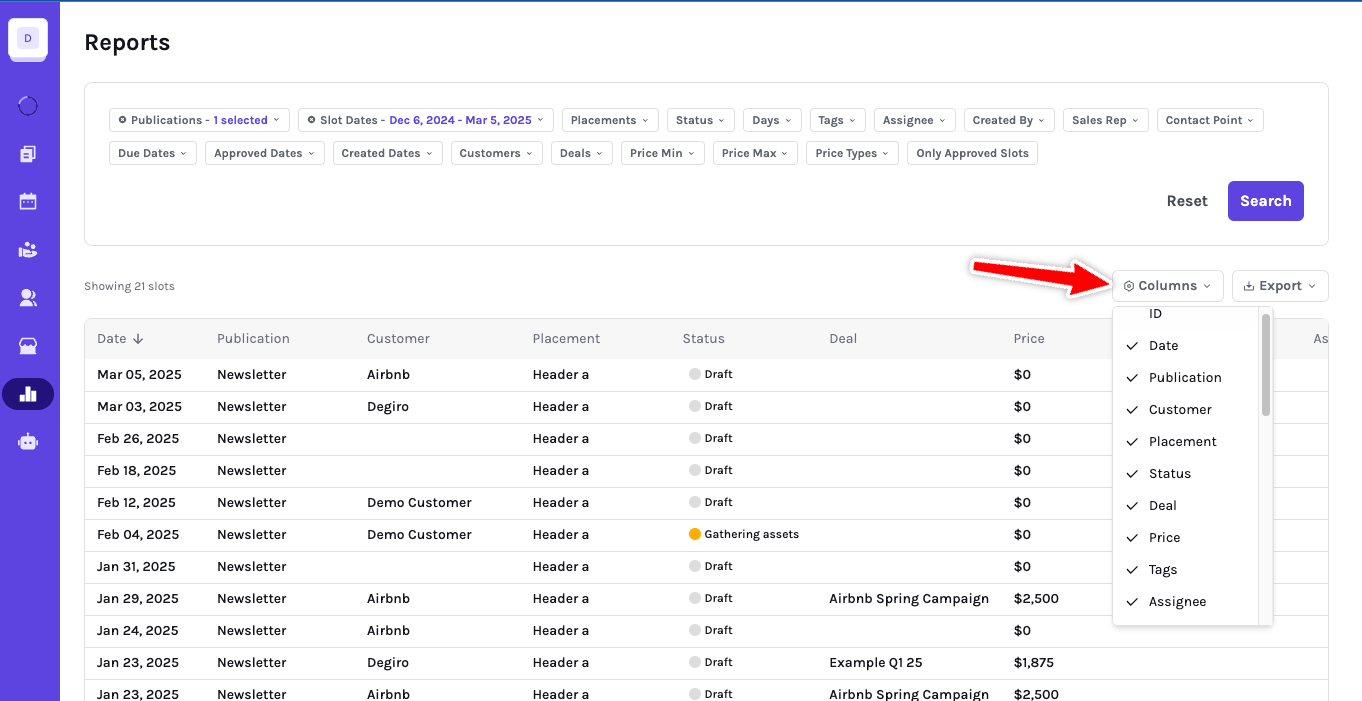
Tailor your data view by selecting or deselecting columns using the Columns option located at the top right corner of the table. Your visible columns control what you see in the report and what gets included when you export the current view.
Flight dates and sorting
In Deals reports, the Flight dates column shows the earliest scheduled start and latest end of the deal's booked units. A single-day booking uses its scheduled day as its end date. Deleted bookings, undated bookings and invalid date ranges do not contribute to the range. A deal without a usable booked date shows a dash. These dates come from the bookings, not the optional date entered on the deal.
When Reporting readiness is active, the flight range uses the same placement exclusions. For example, excluding a long-running discount code keeps its end date out of both the flight range and the readiness calculation.
Deals reports start with the latest flight end first, with undated deals last. Click a column header to change the column or direction. Sorting happens before result pages are selected, so it applies across every page. Changing the sort returns to the first page. Save the report to keep the selected order; reports without a saved order use the latest flight end.
Editing deal custom fields
You can edit text and date custom fields directly in a Deals report when your plan and deal-update permissions allow it. This is useful for fields such as Report Send Date, Invoice Number, and Invoice Send Date.
Click the field's cell to open its editor, enter a value, then choose Save or Cancel. Use Clear to remove an optional field's value before saving. Required fields must keep a value. Saving updates that field on the shared deal and refreshes the report. If the new value no longer matches the report's filters, the deal leaves the results. Other custom fields on the deal keep their values.
These fields record information about your workflow. Editing an invoice number or send date does not issue an invoice or record a payment. Users without deal-update permission can still view the fields they have access to, but cannot edit them here.
Proposals and Orders reports
The Proposals tab lists the proposals created in the selected period. Filter by created date (the last 90 days by default) and by status. The table shows each proposal's created date, customer, deal, status, number of items, total value and sent date; use Columns to add the accepted date, expiry date or creator. Click a row to open the proposal. Total value adds up the proposal's items.
The Orders tab lists the orders placed on your storefronts in the selected period (last month by default). Filter by created date and status. The table shows each order's date, sponsor, storefront, number of items, total, status and payment date; add the discount or coupon code from Columns. Click a row to open the order. Draft orders, which a sponsor started but never submitted, are not included.
Both tabs support charts, a totals row, CSV and JSON export, and saving, like any other report. Large results show the first 100 rows, with Show more to load the rest; totals and exports always cover every matching row.
Saved reports
After configuring filters, columns, report type, sorting, and chart options, click Save report (or the pencil next to the report name) to name it and choose who can see it:
- Personal: only you can see the report.
- Workspace: everyone in the workspace can open it.
Saving reports is available on every plan. Saved reports appear on the Reports home and in the Saved Reports sidebar.
Updating a saved report
When you change a saved report, a bar tells you it has unsaved changes and offers three choices:
- Update report saves the changes to the report. Only the person who created a report can update, rename, share or delete it.
- Save as new saves the current view as a separate report and leaves the original as it was.
- Discard goes back to the saved version.
A saved report keeps its type. If you switch a Slots report to the Orders tab, for example, save that view as a new report.
Sponsy asks before you leave a report, open another one or start a new one while you have unsaved changes.

On Pro and Custom, you can also share workspace reports by email when you need to send the same report setup to another teammate.
Charts
Turn on Plot to visualize the current report above the table. You can choose Bar, Line, Scatter, or Pie charts, then configure the X and Y axes, optional grouping, and aggregation method.
Supported aggregations include Sum, Average, and Count. When none of the visible columns has numbers to add up, the chart counts rows instead. Chart settings are saved with the report, so the visualization is restored when you reopen it. The chart is available on Proposals and Orders reports too.
Exporting Reports
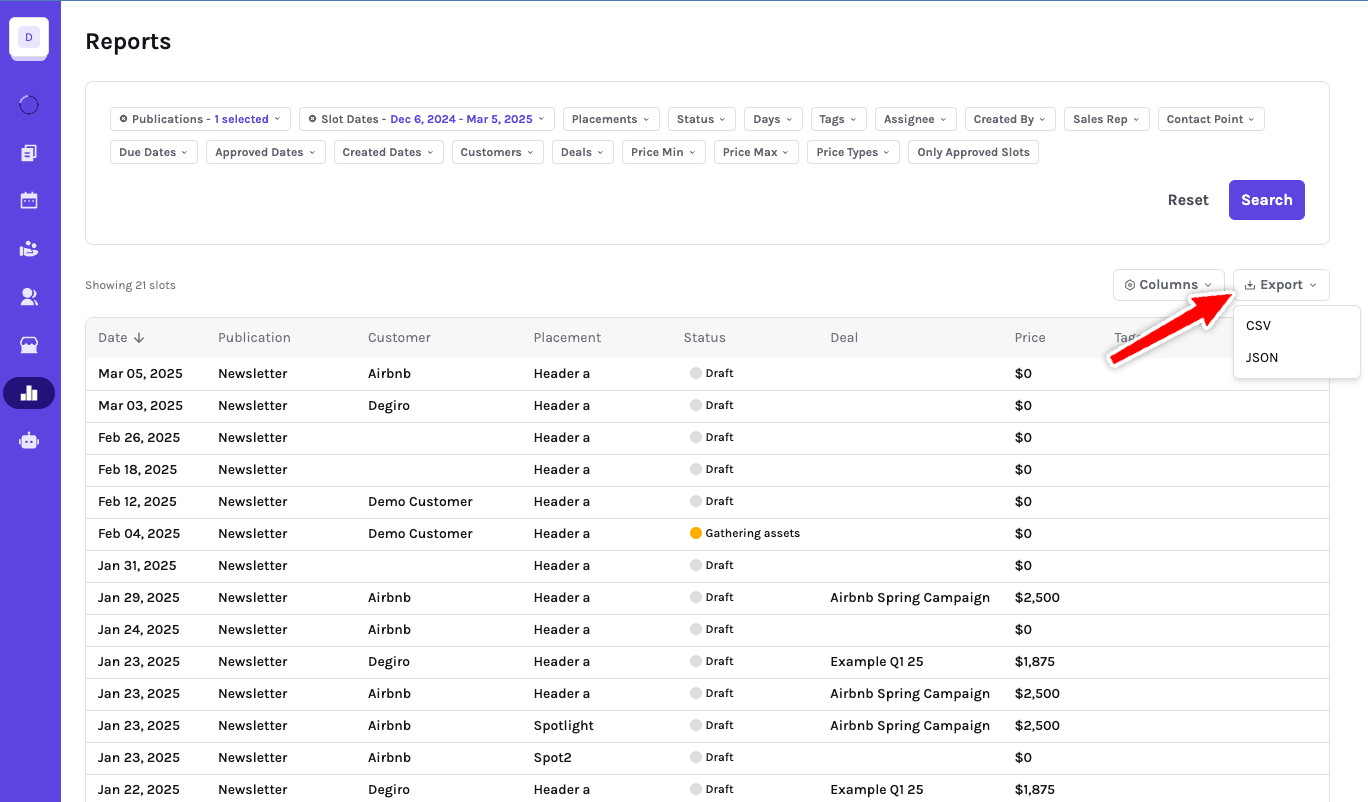
On Pro and Custom, use Export to download the current report as CSV or JSON. Exports respect your current filters and visible columns. This works the same way on Proposals and Orders reports; amounts are left blank for members without access to financial data.
For deal reports, use the line-item export when you need each deal broken down into the publication, placement, date, customer, and price rows that make up the deal. This is useful for finance reviews, campaign reconciliation, and spreadsheet handoffs.
Tracked deals keep their aggregate Conversions metric and show event names in a separate Tracked events panel. Each event separates last-touch conversions from assisted attribution. In Deal → Metrics → Per-Slot Breakdown, expand a slot to see the event counts for that run.
When deal conversion tracking is enabled, Sponsy uses the visitor's 30-day sponsored-click path. The newest valid slot receives last-touch credit. Earlier distinct slots receive assisted credit. Cross-publisher touches can contribute without exposing another publisher's slot details.
Tracked-event CSVs include the event, slot label, slot ID, run date, publication, placement, attribution role, and count. The per-slot export and Export all include event rows for slots matching the current table filters. The deal-level Tracked events download covers the whole deal. Dates use YYYY-MM-DD; undated slots retain their slot ID.
URL builder in reports
The publication-level URL builder helps keep sponsor URLs consistent by applying the right query parameters when slot content is saved. Cleaner links make exported reports easier to reconcile with campaign, publication, placement, deal, and slot data.
By leveraging Sponsy’s Reports module — together with Metrics for workspace-wide analytics — you gain a comprehensive understanding of your sponsorship performance, empowering you to make data-driven decisions that enhance revenue and optimize your sponsorship strategies.